 StatPak
The Analysis ToolPak, Solver and Goal Seek, inside Google Sheets.
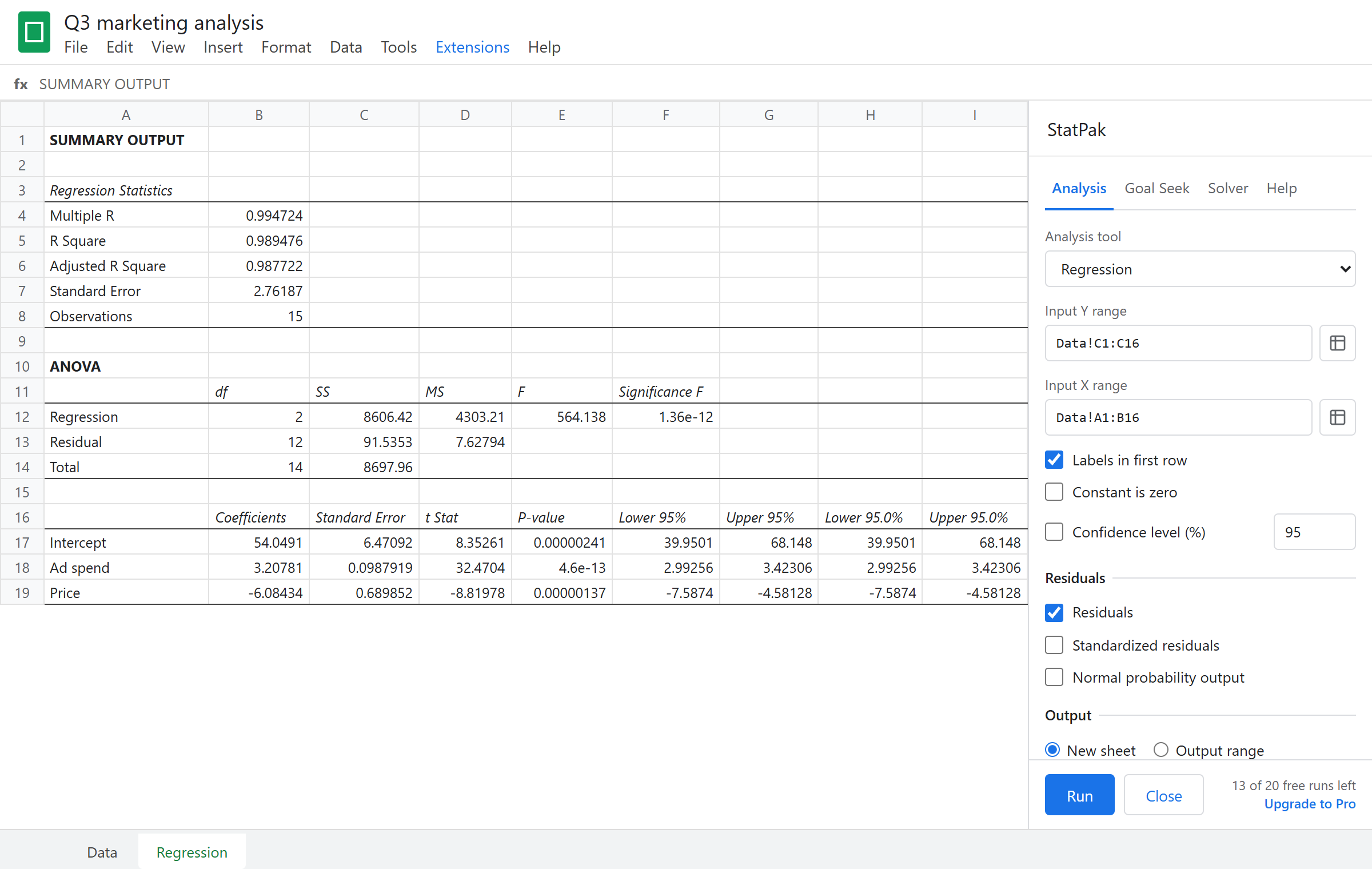
Run regression, ANOVA, t-tests and 16 more analyses, or optimize a model with Solver. Results are laid out like Excel's, so they line up with your textbook, your course and your colleagues.
Free to install. Works in any Google Sheets file. Nothing to download.
Your old add-on stopped working. This one works.
In June 2026 Google shut down the old Apps Script runtime, and several popular Sheets add-ons for statistics, Solver and Goal Seek stopped opening. If your Extensions menu only shows "Help", StatPak is the replacement: the same tools, the same output layout, rebuilt and maintained.
Excel-style output
Tables use the same rows, labels and statistics as Excel's Analysis ToolPak, so answers line up with textbooks and answer keys written for Excel.
Accurate to the last digit
Every tool is checked against SciPy and statsmodels. p-values and critical values come from high-precision distribution code, not approximations.
Pick ranges like in Excel
Click a range box and select cells in the sheet. The box follows your selection, just like Excel's reference boxes.
All 19 Analysis ToolPak tools
Open Extensions, StatPak, Data Analysis, then pick a tool.
- Anova: Single Factor
- Anova: Two-Factor With Replication
- Anova: Two-Factor Without Replication
- Correlation
- Covariance
- Descriptive Statistics
- Exponential Smoothing
- F-Test Two-Sample for Variances
- Fourier Analysis
- Histogram (with Pareto and cumulative %)
- Moving Average
- Random Number Generation
- Rank and Percentile
- Regression (with residuals and probability output)
- Sampling
- t-Test: Paired Two Sample for Means
- t-Test: Two-Sample Assuming Equal Variances
- t-Test: Two-Sample Assuming Unequal Variances
- z-Test: Two Sample for Means
Solver and Goal Seek
Set an objective cell, choose the cells to change, add constraints, and solve. StatPak reads the model straight from your formulas.
Linear programming
Product mix, blending, staffing, transport and budget allocation models, solved with the Simplex method.
Integer, binary and nonlinear
Mark variables as integer or binary for scheduling and yes/no decisions, or switch to the nonlinear method for models with products and powers.
Goal Seek
Find the input that makes a formula hit a target: break-even volume, loan payment, required growth rate.
Pricing
Every tool is in both plans. Pro removes the monthly limit.
Free
- All 19 analysis tools, Goal Seek and Solver
- 20 runs per month
- Excel-style output
Pro
- Unlimited runs
- Larger Solver models
- Priority email support
Questions
Does the output match Excel?
StatPak produces the same tables, in the same order, with the same labels as Excel's Analysis ToolPak. Every statistic is verified against SciPy and statsmodels, the reference libraries used in research.
Can StatPak see my other files?
No. StatPak only asks for access to the spreadsheet you open it in. It cannot read your Drive or other files, and your data is never sent to our servers.
Does it work on Chromebooks and school accounts?
Yes, anywhere Google Sheets runs in a browser. Some school domains require an administrator to allow add-ons first.
What counts as a run?
One click of Run, Find or Solve. Opening the sidebar or picking ranges is free.
How do I cancel Pro?
From the billing link in your receipt email, any time. You keep Pro until the end of the period you paid for.